
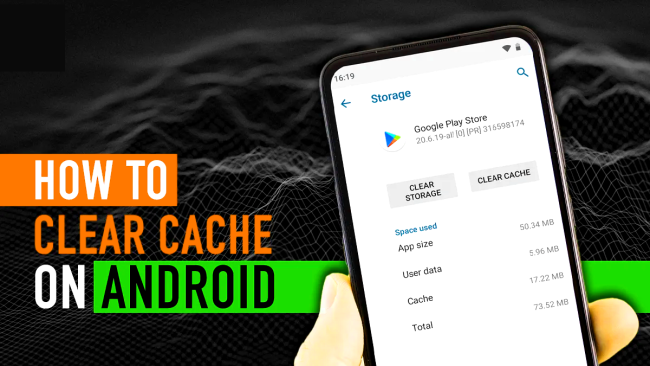
In the ever-evolving world of technology, Android devices have become an integral part of our daily lives. However, with prolonged use, the cache on these devices can accumulate, affecting performance. This article will guide you through the process of clearing the cache on Android, ensuring optimal functionality.
What is cache, and why clear it on Android?
Cache is a temporary storage area that Android apps use to save data like images, scripts, and files to help them load faster when you reopen them. For example, when you browse social media or visit websites, clearing the Cache on Android: cached data ensures that frequently accessed content loads almost instantly instead of downloading it again. However, over time, these cached files can accumulate and take up significant storage space, leading to slower performance, app crashes, or even reduced battery efficiency.
Clearing the cache helps free up this space, removes outdated data, Clearing the Cache on Android: and refreshes the system so apps run smoothly and efficiently. It’s a simple yet effective way to maintain your device’s speed, stability, and overall health without affecting your personal information or app settings.
Importance of Regular Cache Clearance
Quick Guide: How to Clear the Cache on Android
Wondering how to tackle this task efficiently? Follow these simple steps:
- Navigate to Settings. Open the Settings app on your Android device.
- Select Storage: Look for the ‘Storage’ option in the Settings menu.
- Choose Cached Data: Find and tap on ‘Cached Data.’ Confirm when prompted to clear the cache.
- App-specific Cache Clearance: For a more targeted approach, go to ‘Apps’ in Settings, select the app, and clear its cache individually.
Read More: Top 10 Fastest Browsers For Windows in 2023
Clearing the Cache on Android- A Closer Look
Delving deeper into the cache-clearing process, let’s explore the intricacies and benefits of keeping your Android device in top-notch condition.
The Ins and Outs of Clearing Cache on Android
Clearing the cache involves deleting temporary files, giving your device room to operate efficiently. This process varies slightly among different Android versions, but the core concept remains the same.
App-specific Cache Clearance
Each app accumulates its cache over time. This can lead to issues such as slow loading times or crashes. By individually clearing app caches, you can address specific performance concerns.
How to Clear the Cache on Android Effectively
Optimizing your device’s performance is a straightforward process. Here’s a step-by-step guide to ensure you clear the cache effectively:
- Regular check-ins: Make cache clearance a routine task to prevent buildup.
- Storage Management: Monitor your device’s storage and clear the storage when it approaches capacity limits.
- App Updates: Updating apps regularly can help avoid cache-related issues.
5 Best Cache Clear Apps for Android
1. Clean Master: Antivirus, Applock & Cleaner
Clean Master is a comprehensive utility app that not only clears the cache but also provides antivirus and app-lock features. Its intuitive interface allows users to quickly optimize their devices by clearing unnecessary files, enhancing speed, and boosting overall performance.
Pros:
| Pros | Details |
|---|---|
| User-Friendly Interface | Clean Master provides an intuitive interface, making it easy for users to navigate. |
| Multi-Functionality | Alongside cache clearing, it offers antivirus and app-lock features for comprehensive use. |
| Quick Optimization | Efficiently clears unnecessary files, enhancing device speed and overall performance. |
Cons:
| Cons | Details |
|---|---|
| Ads and Promotions | Users may encounter ads and promotions, impacting the overall user experience. |
| Resource Intensive | Some users report that Clean Master can be resource-intensive, affecting performance. |
2. CCleaner: Cache Cleaner, Phone Booster, Optimizer
Known for its effectiveness on desktops, CCleaner brings its cache-clearing prowess to Android. This app not only clears the cache but also cleans residual files, freeing up valuable storage space. The phone booster feature ensures your device runs at its peak.
Pros:
| Pros | Details |
|---|---|
| Trusted Brand | CCleaner, a well-known desktop tool, brings its reputation for effectiveness to the mobile realm. |
| Comprehensive Cleaning | It clears cache and residual files and optimizes device performance with its phone booster feature. |
| User-Controlled Cleaning | Users have control over which files to delete, providing a more personalized cleaning experience. |
Cons:
| Cons | Details |
|---|---|
| Limited Advanced Features | Compared to desktop versions, CCleaner for Android has fewer advanced features. |
| Interface Complexity | Some users find the interface slightly complex, especially for first-time users. |
3. App Cache Cleaner – 1Tap Clean
Simplicity meets efficiency with App Cache Cleaner. This app allows users to clear their cache with just one tap, making it a quick and convenient solution. It also provides insights into storage usage, helping you manage your device’s space effectively.
Pros:
| Pros | Details |
|---|---|
| One-Tap Cleaning | Offers a simple and quick one-tap solution for clearing cache, enhancing convenience. |
| Storage Insights | Provides insights into storage usage, helping users manage space effectively. |
| Lightweight App | Consumes minimal resources, ensuring it doesn’t burden the device’s performance. |
Cons:
| Cons | Details |
|---|---|
| Limited Additional Features | Focuses primarily on cache clearing, lacking some advanced optimization tools. |
| Occasional Advertisements | Users may encounter occasional ads, impacting the overall user experience. |
4. SD Maid: System Cleaning Tool
SD Maid goes beyond standard cache clearance, offering a comprehensive system cleaning solution. It identifies and removes orphaned files, duplicates, and other unnecessary data, ensuring your Android device operates at its best.
Pros:
| Pros | Details |
|---|---|
| Comprehensive System Cleaning | Goes beyond cache clearance, identifying and removing orphaned files and duplicates. |
| Advanced Customization | Offers advanced features for users who want a more customized and detailed cleaning process. |
| Regular Updates | Frequent updates ensure the app remains compatible with the latest Android versions. |
Cons:
| Cons | Details |
|---|---|
| Learning Curve for Beginners | Some users may find it challenging initially due to the abundance of features. |
| Free Version Limitations | The free version has limitations on certain advanced features. |
5. Norton Clean, Junk Removal
The renowned cybersecurity company Norton Clean specializes in removing junk files and clearing cache on Android. With real-time alerts on cluttered files, this app helps maintain optimal device performance while ensuring security.
Pros:
| Pros | Details |
|---|---|
| Reliable Junk Removal | Norton Clean specializes in removing junk files, providing a reliable solution for cluttered devices. |
| Real-Time Alerts | Alerts users in real-time about cluttered files, enabling proactive maintenance. |
| Security Integration | Comes from a reputable cybersecurity company, ensuring a focus on user security. |
Cons:
| Cons | Details |
|---|---|
| Limited Optimization Features | Focuses primarily on junk removal, lacking some advanced optimization tools. |
| May Encounter Ads | Users may encounter ads in the app, impacting the overall user experience. |
Choosing the Right Cache-Clear App
With the plethora of cache-clearing apps available, choosing the right one depends on your specific needs. Consider factors such as additional features, user interface, and reviews to find the app that best suits your preferences.
Optimizing your Android device’s performance is made easier with these top cache-clearing apps. Each has its unique features, pros, and cons, so choose wisely based on your requirements for an enhanced mobile experience.
FAQs
Q: What does clearing the cache on Android do?
Clearing the cache removes temporary files stored by apps to help them load faster. This can free up storage space and fix minor app glitches or performance issues.
Q: Is it safe to clear the cache on Android?
Yes, it’s completely safe. Cached data is temporary, so deleting it won’t affect your app settings, login info, or personal files. The app will rebuild the cache the next time it’s used.
Q: How often should I clear my Android cache?
It’s best to clear the cache every few weeks or when you notice your phone slowing down, apps misbehaving, or storage space running low.
Q: Do I need a cache cleaner app, or can I do it manually?
You can clear cache manually from the device settings, but cache cleaner apps offer convenience, automation, and advanced features like junk file removal and memory optimization.
Q: Which are the 5 best cache cleaner apps for Android?
Some of the best options include CCleaner, Files by Google, AVG Cleaner, Norton Clean, and All-in-One Toolbox. Each provides unique features like smart cleaning suggestions and real-time performance boosts.
Conclusion
Clearing the cache on Android devices is one of the simplest ways to maintain smooth performance and free up valuable storage space. Over time, cached data can accumulate and slow down your device, making apps sluggish or unresponsive. By removing these temporary files, your phone gets a quick performance refresh without affecting essential data or functionality.
While manual clearing through settings works, dedicated cache cleaner apps make the process effortless and more effective. Tools like CCleaner and Files by Google go beyond simple cache removal — Clearing the Cache on Android: they identify unnecessary files, optimize memory usage, and even improve battery life. This ensures your device stays efficient and responsive with minimal effort on your part.
In summary, regularly managing your Android’s cache is an easy yet powerful maintenance habit. Clearing the Cache on Android: Whether you prefer doing it manually or using one of the top-rated apps, clearing the Cache on Android can significantly enhance your phone’s performance and longevity. A clean system not only runs faster but also ensures that you get the most out of your Android device every day.