Best CRM for Small Business Pricing (2025) Compare Plans, Features & True Costs
Find the best CRM for small business pricing in 2025. Compare costs, features, and hidden fees to choose the right CRM for your budget.


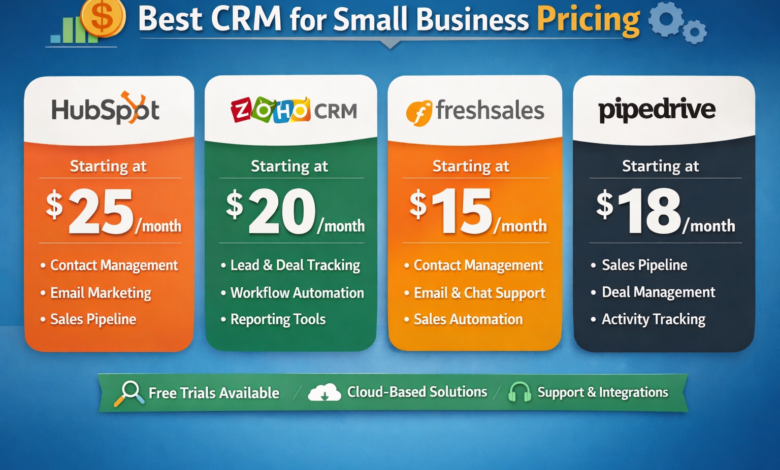
Choosing the best CRM for small business pricing is not just about finding the lowest monthly fee. It’s about balancing cost with value, ease of use, scalability, automation, and the features that actually help you sell more and retain customers. Many small businesses start with a “cheap” CRM and end up paying more later due to add-ons, onboarding fees, and limitations that force upgrades. The good news is that today’s CRM pricing options are more flexible than ever, with free plans, low-cost tiers, and modular features that can grow with your business.
In this guide, you’ll learn how to compare CRM plans the right way, what “pricing” really includes, which tools offer the most value for small teams, and how to avoid hidden costs. By the end, you’ll be able to choose the best CRM for small business pricing based on your exact business needs, not just a marketing page.
What CRM Pricing Means for Small Businesses (And Why It’s Often Confusing)
When most people search for CRM pricing, they expect a simple answer like “$15 per month.” In reality, CRM tools often use tiered plans that bundle features differently. You may see a low price, but the features you need—automation, reporting, email sequences, integrations, or multiple pipelines—might be locked behind higher tiers.
CRM pricing can be confusing for small businesses because it typically depends on five things: number of users, number of contacts, feature limits, add-on tools, and support level. Some platforms charge per user, others charge per contact volume, and a few charge a flat fee for a team. This is why comparing CRMs is not about looking at one number. It’s about looking at your real usage.
A smart way to approach small business CRM costs is to map your needs first: how many users you’ll have in the next 12 months, how many customer records you’ll manage, what sales process you follow, and whether you require advanced automation. Once you know that, evaluating CRM software pricing comparison becomes far easier—and you’re less likely to overspend.
Best CRM for Small Business Pricing (2025 Plans Compared)
The best CRM for small business pricing is the one that matches your stage of growth, keeps essential features accessible, and doesn’t punish you with expensive upgrades when your business gains momentum. Below is a practical pricing-focused breakdown of popular CRM platforms, highlighting which type of small business each one fits best.
HubSpot CRM Pricing: Best for Beginners and Marketing-Sales Alignment
HubSpot is famous for its entry-level value because it offers a strong free plan that includes contact management, deals, email tracking, and basic pipeline tools. For small businesses that are just starting, the free tier is a legitimate option, not a stripped-down demo. As you grow, paid plans unlock automation, advanced reporting, and scalable marketing features.
For many teams, HubSpot becomes the best value CRM when you need a combined sales and marketing system. The trade-off is that scaling can get costly because certain advanced features require higher-tier subscriptions, and onboarding for complex setups may involve extra planning.
If your priority is fast setup and a clean user experience, HubSpot is often considered a top small business CRM. It’s also one of the most searched tools for CRM with email marketing and sales pipeline management.
Zoho CRM Pricing: Best Affordable CRM for Small Business With Depth
Zoho is widely recognized as an affordable CRM for small business because it provides strong features even at lower tiers. You get contact and lead management, workflow automation, dashboards, and customization. Zoho becomes particularly appealing if you already use Zoho’s other tools such as Zoho Books or Zoho Campaigns, because the ecosystem integration can reduce your software stack cost.
Zoho can feel more complex than some competitors, but that complexity is what gives it power. For budget-conscious teams that still want automation, it’s one of the best answers for CRM cost per user value.
If you want a balance between pricing and advanced sales tools, Zoho often ranks highly for CRM pricing searches.
Pipedrive Pricing: Best for Sales Pipelines and Simple Scaling
Pipedrive is a sales-first CRM designed around visual pipelines and deal tracking. It’s frequently recommended as a sales CRM for small business because it focuses on daily sales activity, follow-ups, and forecasting.
Its pricing is typically straightforward per user per month, making it easier to estimate your monthly CRM pricing. Where costs can increase is when you add lead generation tools, advanced automation, or extra reporting features, depending on your plan.
For small teams that want a clean interface and a structured sales process without excessive complexity, Pipedrive offers strong pricing value.
Freshsales Pricing: Best for Automation at a Competitive Price
Freshsales is a strong option if you want built-in automation and AI-style features without paying enterprise-level pricing. It’s positioned well as a CRM with automation for small business, offering email sequences, lead scoring, and integrated calling on certain plans.
Freshsales can be a good middle-ground option for teams that want modern sales capabilities while keeping the CRM cost per user reasonable. It’s also popular among those searching for best CRM for startups because it scales logically from basic to advanced use.
Salesforce Starter Pricing: Best for Long-Term Scalability (But Watch Complexity)
Salesforce is the most recognized name in CRM, and its starter packages can look appealing. For some small businesses, Salesforce becomes a future-proof choice because it can expand into almost any workflow through apps and customization.
However, Salesforce often comes with higher setup complexity, and costs can grow quickly if you require custom dashboards, automation, or integrations. You’ll also want to consider CRM implementation cost, especially if you need help configuring it.
If your business plans to grow aggressively and you want a platform that can scale into enterprise workflows, Salesforce can be worth it. If you just want an easy-to-use system now, it may not be the most efficient option.
How to Choose the Right CRM Plan Without Overspending
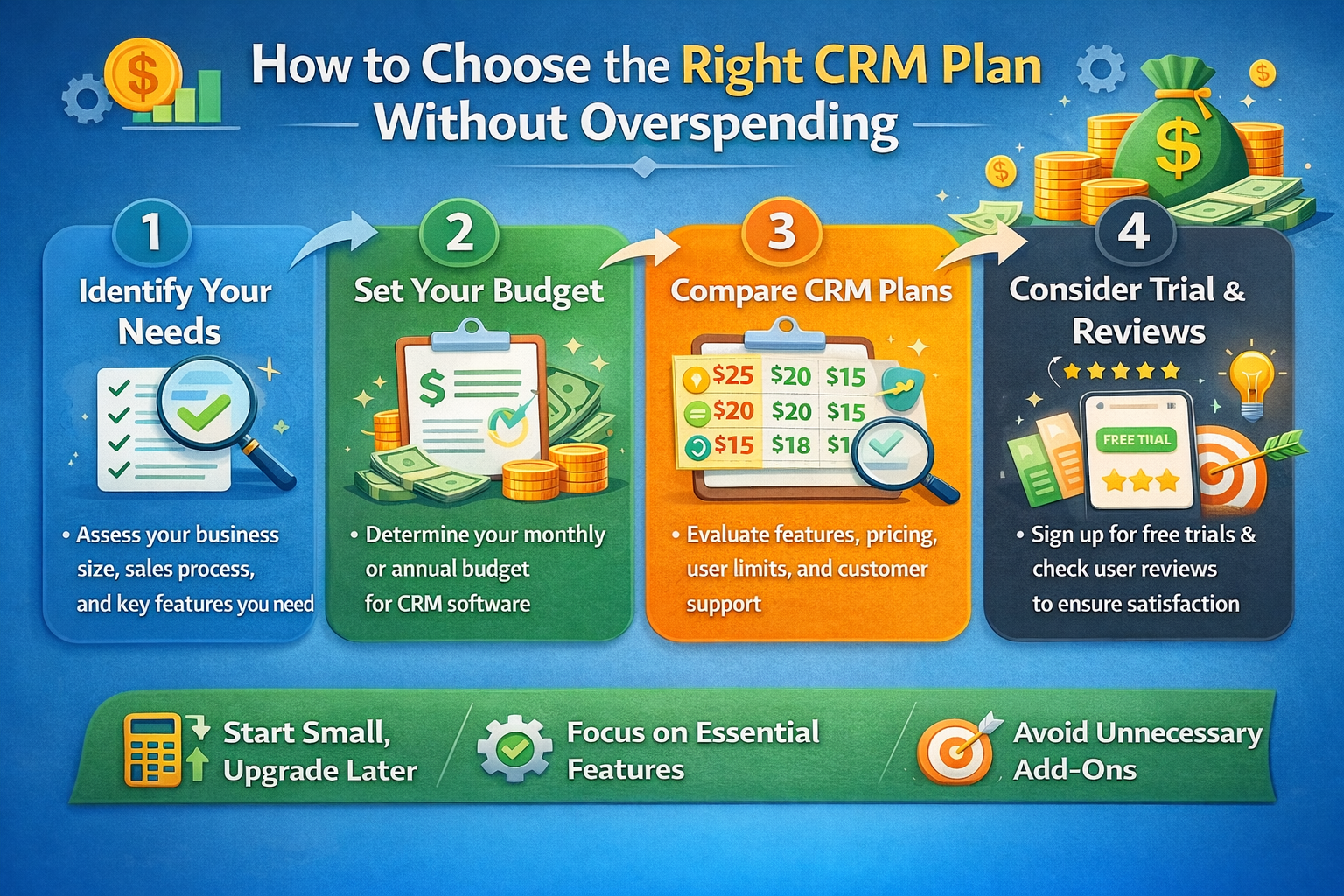
Many small businesses choose the wrong plan because they focus on the entry price instead of the total cost. The best approach is to evaluate CRM pricing based on what you actually need to run your workflow, not what the CRM vendor highlights on the pricing page.
Start by identifying the “non-negotiable” features. For example, if your team relies on email outreach and follow-ups, then CRM with email marketing or sequences is not optional. If you manage multiple services or sales processes, you may need multi-pipeline support, which can be locked behind higher tiers. If you rely on performance insights, then reporting and dashboard access becomes essential.
Then, compare CRM plans by looking at pricing in the context of your team size. A CRM that costs slightly more per user might still be cheaper overall if it includes automation and integrations that replace other tools. This is where many businesses discover that “cheap CRM software” is not always the same as the best value CRM.
Hidden Costs in CRM Pricing That Most Small Businesses Miss
A big reason people keep searching for best CRM for small business pricing is because pricing is rarely as simple as it looks. Even honest vendors may not highlight the full picture unless you read the details. Here are the most common cost traps that affect your true CRM spend.
Add-On Costs and Feature Locking
Some CRMs price their base plan low, but lock essential features behind add-ons. Examples include extra automation workflows, phone calling, advanced reporting, and lead generation tools. Before choosing a CRM, compare what each plan includes, especially around workflows, integrations, and reporting.
If you need these features immediately, choosing a CRM solely based on the lowest tier can lead to upgrade pressure within weeks.
User-Based Pricing That Scales Faster Than Expected
Many vendors charge per user, which is fair, but can become expensive as you grow. It’s easy to underestimate this. For example, you might start with two users and add four more within six months as you hire. Suddenly, CRM cost per user becomes the biggest part of your overhead.
A good way to plan is to estimate the number of users in 12 months and calculate your likely yearly cost. This helps you avoid switching CRMs later.
Data, Contact, or Email Sending Limits
Some CRMs limit how many contacts you can store or how many emails you can send. If you’re in eCommerce or service businesses with recurring customers, these limits matter. Always check whether contact limits apply to your plan. This is especially important for those considering a free CRM for small business, because free tiers may restrict automation or email features.
Implementation, Migration, and Training
Even a low-priced CRM can become expensive if your setup takes a long time. Consider CRM implementation cost if your team needs onboarding sessions, custom workflows, or data migration help. Some platforms offer migration assistance, while others require you to do it manually or pay partners.
For small businesses, the cheapest CRM is often the one you can adopt quickly with minimal training. Time has a real cost.
CRM Pricing Models Explained for Small Business Buyers
Understanding how pricing works makes it easier to choose the best CRM for small business pricing. Most CRM providers use one of these pricing models.
Per-User Monthly Pricing
This is the most common. You pay a monthly fee for each user account. It’s simple, but you must estimate growth. If you scale headcount quickly, costs rise quickly. This is where CRM cost per user becomes a key metric.
Tiered Feature-Based Plans
Many CRMs have multiple tiers: basic, professional, enterprise. Each tier unlocks additional features. This pricing model is flexible, but can feel frustrating if you need one advanced feature but must upgrade to access it.
Contact-Based Pricing
Some CRMs price by the number of contacts stored. This can be good for teams with few users but large customer databases, or bad for businesses that store many leads and customer records. For marketing-heavy workflows, contact limits can become a major cost driver.
Modular Pricing With Add-Ons
Some CRMs have a base plan and optional add-ons for features like marketing automation, calling, AI tools, or advanced analytics. This can be great because you only pay for what you use, but it can also hide true costs until later.
How to Match CRM Pricing to Your Business Stage
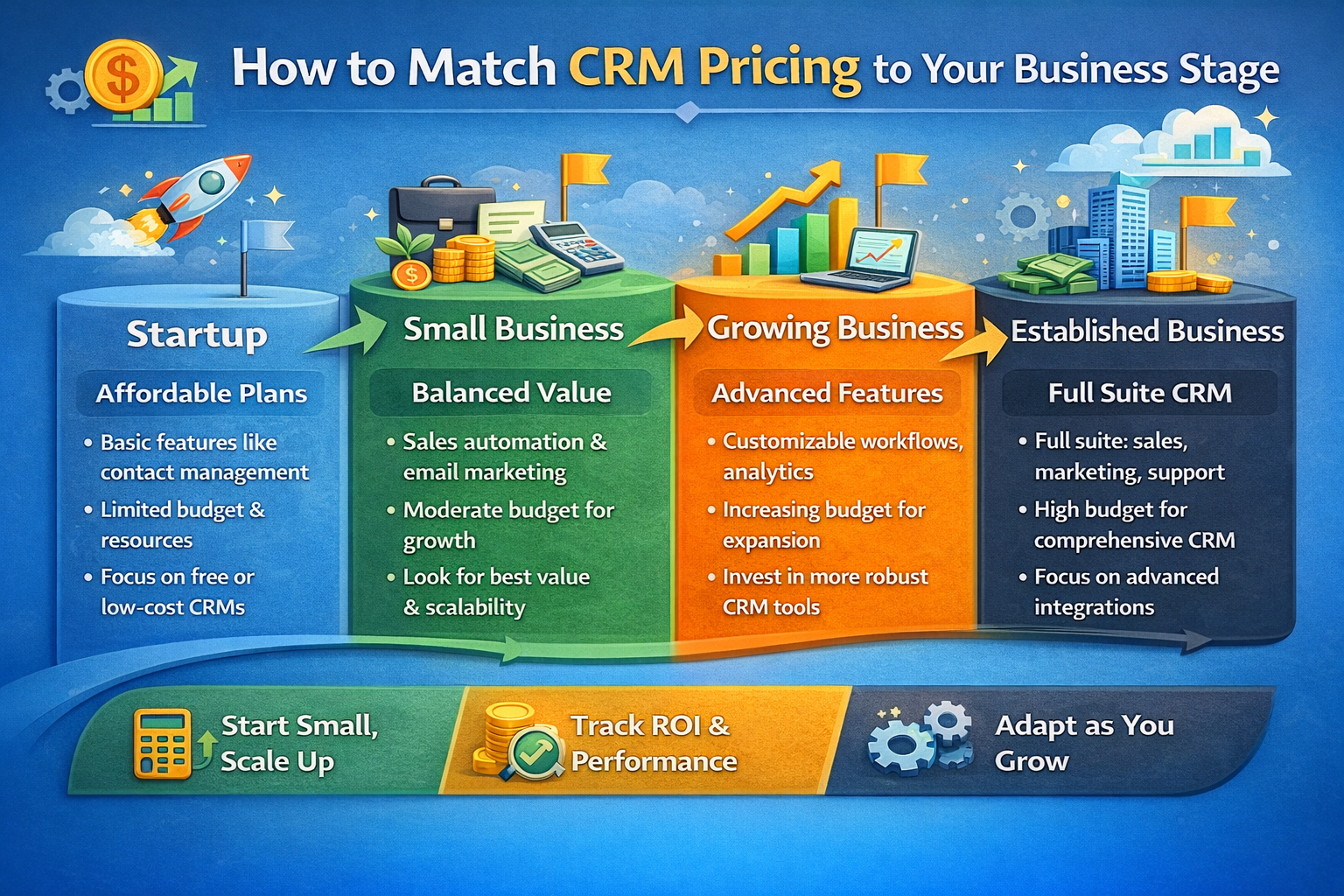
Your best CRM choice depends heavily on where your business is right now.
If you are just starting, a free CRM for small business or a very low-cost plan is often enough. Your focus is contact management, deal tracking, and basic follow-ups. Many startups don’t need heavy automation yet, and it’s smarter to keep the system simple.
If you are growing, you’ll benefit from workflows, automation, reporting, and integrations. This is where teams often search for affordable CRM for small business solutions that include automation without a steep jump in price.
If you are scaling fast, your CRM becomes your operating system. You may need multiple pipelines, role permissions, forecasting, advanced reporting, and flexible integration support. At this stage, the best CRM for startups may differ from the best option for a mature business, even if the pricing looks similar.
Best CRM Features That Influence Pricing the Most
When comparing CRM costs, certain features typically push the price up. Knowing which ones matter helps you choose the right tier without paying for features you won’t use.
Automation and Workflow Builders
A CRM with automation helps your small business save time by assigning leads, sending follow-ups, and moving deals through stages automatically. Because automation impacts productivity and revenue directly, it’s often reserved for paid tiers.
Email Marketing and Sequences
Many businesses want a CRM with email marketing, but there’s a difference between simple email tracking and actual email sequences with automation. If you need campaigns, templates, and sequence analytics, you may need a higher plan or an add-on.
Reporting and Forecasting
Basic reports may be included, but advanced dashboards and forecasting tools are often premium. For teams that manage multiple reps or track multiple pipelines, reporting becomes essential.
Integrations
The ability to connect with Gmail, Outlook, Google Calendar, Slack, Stripe, Shopify, or accounting tools can be included or limited depending on plan. If your business depends on integrations, factor this into your CRM pricing comparison.
Support and Onboarding
Cheaper plans often offer limited support. If your team needs onboarding, training, or priority support, a higher tier may be worth it simply to reduce adoption time and mistakes.
Important Keywords People Search for on Google (First Page Related Terms)
Search intent matters. People looking for the best CRM for small business pricing also search for related terms that reflect specific needs. These keywords can guide your decision because they show what most small business owners actually care about.
Many buyers search for CRM pricing, small business CRM, best CRM for startups, and CRM software pricing comparison because they want a cost breakdown and clear comparison. Others focus on affordability and search for affordable CRM for small business or cheap CRM software, but often still want automation and integrations. A major group searches for free CRM for small business, usually early-stage startups or solo founders who want to manage leads without paying upfront.
You’ll also see strong search volume around function-based needs such as CRM with pipeline management, CRM with email marketing, CRM with automation, sales CRM for small business, and customer management software. These terms often point to the “real reason” people buy a CRM: they want follow-ups to be easier, sales tracking to be clearer, and customer history to be accessible.
Including these needs in your comparison helps you choose the right system with the best pricing-to-value ratio.
CRM Pricing Comparison Strategy (The Fastest Way to Pick the Right One)
If you want a practical method to decide, use this approach. First, decide what success looks like. For some businesses, success means closing more deals with better follow-up. For others, it’s improving customer retention through better service tracking. Your CRM must support your goal without forcing you into a plan you don’t need.
Second, calculate a realistic monthly budget. Many small businesses spend more money on tools than necessary because they buy features they don’t use. A smart baseline for a small team is to estimate cost for three to five users and compare that against your expected monthly revenue impact.
Third, prioritize ease of use. A CRM that your team doesn’t adopt is not cheap—it’s a waste. A slightly higher-priced CRM that your team uses daily can be far more profitable than a cheap system that causes confusion.
Fourth, review upgrade pressure. The best CRM for small business pricing is one where you can comfortably stay on a plan for at least a year, without constantly hitting feature limits.
Conclusion
Finding the best CRM for small business pricing means choosing a platform that fits your workflow today and still makes sense as you grow. The smartest CRM decision is not the cheapest monthly plan—it’s the plan that delivers strong value, keeps essential features accessible, and avoids painful upgrade pressure.
If you want a quick starting point, begin by listing your required features, estimating your team size in 12 months, and comparing the real monthly cost across platforms. Pay close attention to automation, integrations, and reporting, because those features often drive productivity and revenue.
If you’re ready to choose the best CRM for small business pricing, take your top two options and test them with real deals and real customer data for a week. That single step will give you clarity that no pricing page can.
When you’re ready, pick the CRM that gives you the best long-term value and build a sales process your team will actually use.
Read More: Small Business Growth Strategies That Work in 2025